Send a general letter to a public authority

It is important, that the text of the letter must be written in Polish language.
First go to the website of this service

You can read an English version of the service description, but the form in the end will be already in Polish.
This leads you to this website: https://moj.gov.pl/pismo-ogolne/usluga-online/engine/ng/index?xFormsAppName=PismoOgolneDoPodmiotuPublicznego&xFormsFormName=Wniosek
Define whom do you want to address your letter to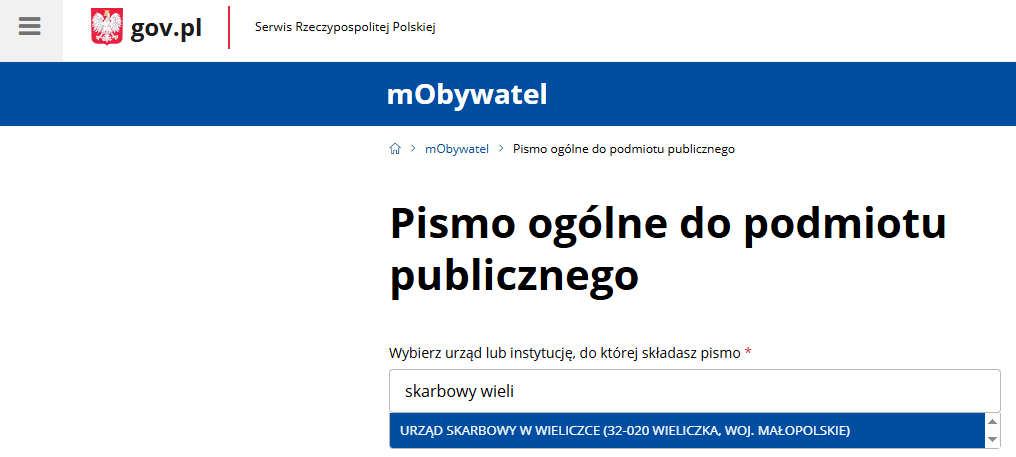
Choose what kind of letter are you sending
In most cases using "Wniosek" for a request or "Informacja" to send additional information e.g. to the tax office are perfect.
Add a specific title to the letter

Be specific as much as you can! If you are sending a reply in as existing case, use that case number and add what you are sending in that case
See an example below.
If you do not have a case ID or a case at all, make sure the recipient knows what you wish share with them. Add identification data (NIP, PESEL), name a related document (like "PIT-36 za 2023") and a short description.
Enter the text of the letter
Add attachments
This part is optional, unless it is requested in the letter you received. After uploading a file, specify the contents of it. File name may be descriptive, but a proper description must be added.
Check your contact details
Check your contact detail and go further with the sending.
Sign and send
On the next page you will see a proper summary of your letter, ready to be signed and sent.
Choose the "Podpisz i wyślij" option to sign and send your letter.
You will be redirected to Profil Zaufany to sign your letter by Podpis Zaufany.
The system will display a message when your letter is successfully signed and sent.